
If you searched for "AdWords" and ended up here, you're not behind — you're just working from an older name. Google renamed the platform in 2018, and the confusion has been baked into the industry ever since. This article covers what actually changed, how the platform works under the hood, what it realistically costs, and how to set up your first campaign without burning money on avoidable mistakes.
Key Takeaways
- The rebrand is just a name change. Google AdWords became Google Ads on July 24, 2018. Existing accounts, campaigns, and billing transferred automatically — nothing was rebuilt.
- The auction rewards relevance, not just the biggest budget. Ad Rank is determined by your bid multiplied by your Quality Score, so a well-structured ad can outrank a higher-spending competitor.
- Campaign type selection matters more than most beginners realize. Search is almost always the right starting point. Performance Max should wait until you have conversion data.
- There is no hard minimum budget, but "any budget" framing is misleading. A budget too low to generate meaningful clicks produces unreliable data, not results.
- Conversion tracking is the non-negotiable prerequisite. Set it up before you spend a single dollar — without it, you have no way to know which clicks are actually working.
Google AdWords vs. Google Ads: What Actually Changed in 2018
Here is the short answer: nothing changed except the name.
Google AdWords launched in October 2000 as a keyword-based search advertising product. For nearly two decades, it was the dominant name in paid search. Then, on July 24, 2018, Google officially retired the AdWords brand and replaced it with Google Ads — as documented in Google's own announcement.
The reason was practical. By 2018, the platform had expanded well beyond text ads triggered by search keywords. Advertisers could run visual banner ads across millions of websites on the Google Display Network, video ads on YouTube, ads inside Gmail, ads on Google Maps, and app install campaigns — none of which had anything to do with "words" in search. The AdWords name had stopped describing what the product actually was.
What the rename did not do: it did not change how campaigns worked, how billing worked, or how accounts were structured. Every advertiser woke up on July 25, 2018 with the same campaigns, the same settings, and the same historical data — just under a new logo.
If you still hear the name "AdWords" in the wild, it is almost always because someone learned paid search before 2018, is working from an older tutorial, or is using the legacy terminology out of habit. None of that makes their knowledge wrong — the mechanics are the same. The product is just called Google Ads now.
A quick timeline:
- October 2000 — Google AdWords launches as a keyword search advertising platform
- 2010–2017 — Platform expands to include Display, YouTube, Gmail, Maps, and app campaigns
- July 24, 2018 — Google officially rebrands AdWords as Google Ads; all accounts transfer automatically
- 2019–present — Google Ads continues to evolve with Smart Bidding, Performance Max, and AI-driven automation
How Google Ads Works: The Auction, Ad Rank, and What Determines What You Pay
Most beginners assume Google Ads works like a billboard auction — whoever pays the most gets the best spot. That is not how it works, and understanding the difference is probably the most valuable thing you can take from this article.
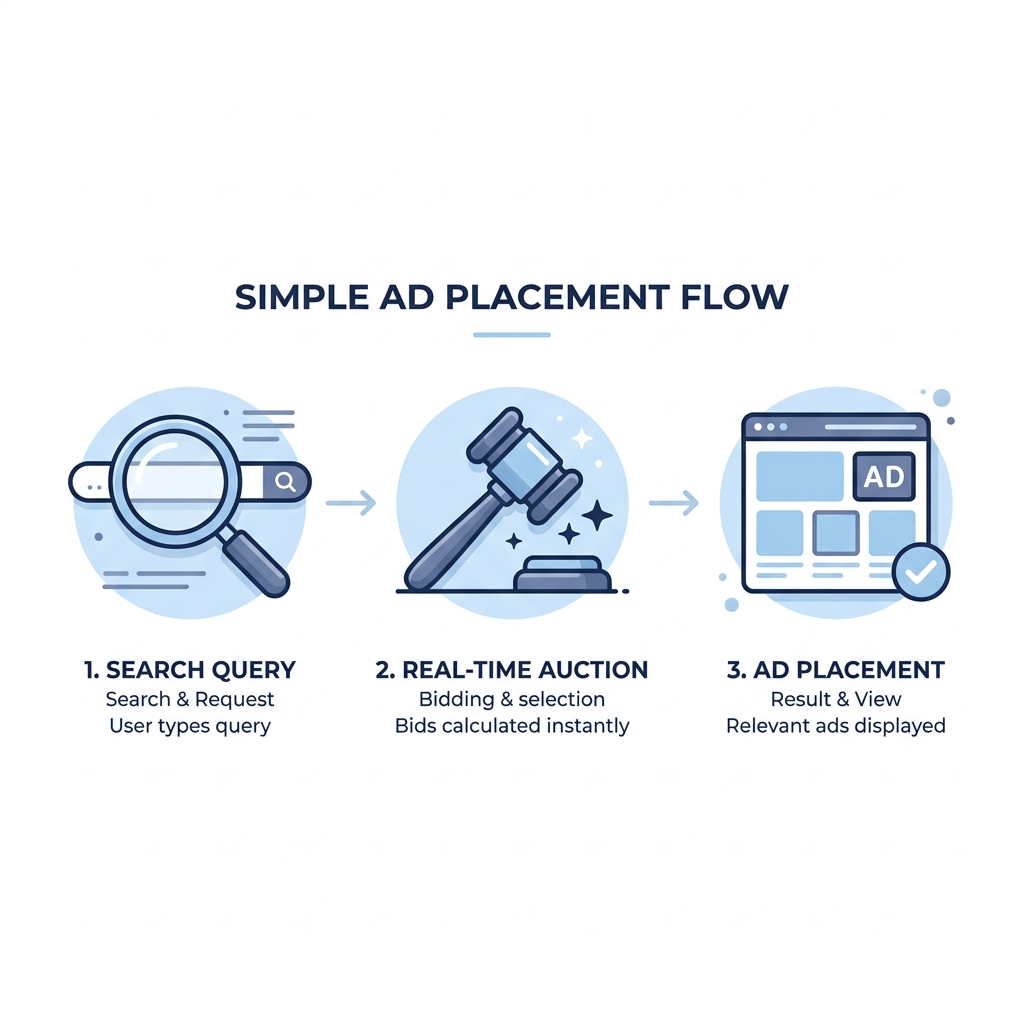
Here is what actually happens every time someone searches on Google:
- A user types a search query into Google.
- Google identifies all advertisers whose campaigns are targeting that query (based on keywords, audiences, and targeting settings).
- Each eligible advertiser enters a real-time auction that runs in milliseconds — before the search results page loads.
- Google calculates an Ad Rank for each advertiser in the auction.
- Ads are displayed in order of Ad Rank, from highest to lowest.
- Each advertiser is charged the minimum amount needed to hold their position — not their maximum bid.
Ad Rank is calculated as: Bid × Quality Score (along with other contextual factors, but this is the core formula for a working mental model).
Quality Score is Google's 1–10 rating of how relevant and useful your ad is. It is based on three factors:
- Expected click-through rate — how likely users are to click your ad compared to similar ads
- Ad relevance — how closely your ad copy matches the intent of the search query
- Landing page experience — whether the page users land on is relevant, fast, and easy to use
Why this matters for cost: A higher Quality Score can actually lower what you pay per click. Google rewards relevance — so a well-written ad pointing to a relevant landing page can beat a competitor who simply bids more.
Worked example:
- Advertiser A bids $3.00 with a Quality Score of 8 → Ad Rank: 24
- Advertiser B bids $4.00 with a Quality Score of 5 → Ad Rank: 20
Advertiser A wins the higher position despite the lower bid — and in most cases pays less per click.
This also means that poor ad copy or a weak landing page isn't just a creative problem — it is a cost problem. Low Quality Scores inflate what you pay per click and reduce where your ad appears. The fix is rarely to bid more; it is to improve relevance.
A note on budget protection: Google will not exceed your monthly budget cap (daily budget × 30.4 days). On high-traffic days, Google may spend up to double your daily budget — but it compensates on slower days to stay within the monthly total. Your maximum exposure is the monthly cap you set.
Google Ads Campaign Types: An Honest Comparison
Choosing the right campaign type is the most consequential decision a new advertiser makes. Google's own interface walks you through this choice with "Best For" labels that are accurate in a narrow sense but leave out the part you actually need to know — the complexity, the limitations, and whether you have the prerequisites to make each type work.
Here is an honest comparison:
| Campaign Type | Best For | Avg. Complexity | Pricing Model | Beginner-Friendly? |
|---|---|---|---|---|
| Search | Leads and direct sales from high-intent users actively searching | Low–Medium | CPC | Yes — best starting point for most businesses |
| Shopping | E-commerce product sales with an active product catalog | Medium | CPC | Yes, with a product feed set up correctly |
| Display | Brand awareness and remarketing to past site visitors | Medium | CPC or CPM | With caution — low intent; poor for cold traffic conversion |
| YouTube / Video | Awareness and consideration; reaching users before they search | Medium–High | CPV or CPM | With caution — requires video creative investment |
| Performance Max | Broad reach across all Google surfaces using AI optimization | High | CPC / CPM / CPV | No — requires existing conversion data to optimize effectively |
| Demand Gen | Social-style placements on YouTube, Discover, and Gmail | High | CPM or CPC | No — better suited to advertisers with brand assets and audience data |
| App | Mobile app installs and in-app conversions | Medium | CPI or CPC | With caution — only relevant for app advertisers |
How to think about campaign selection as a decision:
- Goal is leads or direct sales, just starting out: Search campaign
- Goal is product sales, you have an e-commerce catalog: Shopping campaign
- Goal is staying in front of people who already visited your site: Display remarketing
- Goal is broad reach and you already have solid conversion data: Performance Max
- Goal is app installs: App campaign
A few honest notes on the types that cause the most beginner confusion:
Search is intent-based — your ad appears when someone is actively looking for what you offer. That makes it the highest-purchase-intent format and the clearest place to see whether the platform delivers for your business. Average CPC tends to be higher than Display or Video, but the traffic quality is also much higher.
Performance Max hands significant control to Google's algorithm. It runs across Search, Display, YouTube, Gmail, Maps, and Discover simultaneously. If you have strong conversion data and want broad reach, it can be efficient. If you are just starting out and don't yet know which audiences, placements, or queries actually convert for you, Performance Max is risky — it optimizes toward whatever conversions it finds, and with limited data, those might not be your best customers. Transparency into what is working is also limited by design.
Before committing to a campaign type, it is worth taking a clear-eyed look at whether paid search is the right channel for your business at this stage — campaign type selection only matters if the channel itself is a fit.
How Much Does Google Ads Cost? Budget Control, CPC Ranges, and What to Expect
This is where most Google Ads content on the SERP either goes vague or gives you promotional reassurance instead of actual numbers. Let's be direct.
There is no formal minimum daily budget. Google will let you set $1/day if you want. The problem is not the platform's minimum — it is that a budget too small to generate statistically meaningful clicks will produce inconclusive data, not results. You will spend money and still not know whether the campaign works.
CPC varies significantly by industry. According to WordStream's Google Ads benchmark data, average costs per click range widely:
| Industry | Approximate Avg. CPC (Search) |
|---|---|
| Legal and financial services | $5–$10+ per click |
| Home services (HVAC, plumbing, roofing) | $6–$12 per click |
| Software / SaaS | $3–$7 per click |
| Retail / e-commerce | $1–$2 per click |
| Healthcare | $3–$6 per click |
These are averages — competitive keywords within any of these categories can run higher, and long-tail or niche keywords can run lower.
What a working test budget looks like in practice:
If you are a service business with an average CPC of $4, a $10/day budget yields roughly 2–3 clicks per day — not enough data to make meaningful optimization decisions. A more workable test budget for most service businesses in competitive markets is $30–$50/day for at least 30 days. That generates enough click volume to see patterns.
Budget controls protect you from overspending:
- Google will not exceed your monthly budget cap (daily budget × 30.4)
- On busy days, Google may spend up to 2× your daily budget, but compensates on slower days to stay within the monthly total
- You can pause campaigns at any time
One thing to set honest expectations about: Early campaigns almost always cost more per conversion than optimized, mature campaigns. The first 30–60 days are a learning period — both for you and for Google's algorithm. Bidding strategy, match type, and Quality Score all improve over time. The first month's cost-per-lead is rarely representative of what you'll pay in month three.
Quality Score, keyword match type, bidding strategy, and competitive pressure all affect what you actually pay per click. Investing time in ad relevance and landing page quality is not a creative exercise — it directly affects your CPC.
How to Set Up Your First Google Ads Campaign: A Beginner's Starting Path
Here is a structured path from zero to a live campaign. This is a starting framework, not a comprehensive agency-level setup guide — but it covers the steps in the right order, which matters more than most beginners realize.
- Create a Google account and go to ads.google.com. If you already have a Google account (Gmail, Google Analytics), you can use it. Google will prompt you through initial account setup.
- Choose a campaign goal that matches your business objective. Google offers goal-based prompts (leads, sales, website traffic, brand awareness, app installs). Pick the one that matches your actual objective — this affects which campaign types and bidding options surface.
- Select a campaign type appropriate for your goal and experience level. For most beginners with a lead generation or direct sales goal: Search. If you sell products online and have a feed: Shopping. Avoid Performance Max until you have conversion history.
- Set up conversion tracking before the campaign goes live. This is the non-negotiable step. Conversion tracking tells Google — and you — which clicks resulted in a form fill, a phone call, a purchase, or whatever action matters to your business. Running spend without conversion tracking is like driving without a dashboard: you're moving, but you have no idea where you're going. Set this up via Google Ads' built-in conversion tracking or through Google Analytics 4, then verify it is firing before launch.
- Define your targeting. For Search: start with specific, intent-rich keywords rather than broad terms. Use phrase match or exact match rather than broad match until you understand what queries your ads are triggering. Set geographic targeting to the areas you actually serve. Add audience signals if you have remarketing lists.
- Write ad copy that mirrors the keyword intent and connects to a dedicated landing page. Your ad headline should reflect what the user searched for. The landing page should deliver on whatever the ad promised — not drop the user on your homepage where they have to figure out what to do next. Every ad needs a purpose-built destination.
- Set your daily budget and choose a bidding strategy. For beginners: Maximize Conversions (if you have conversion tracking live) or Manual CPC with a bid cap gives you more control while you learn. Avoid Target ROAS or Target CPA until the campaign has enough conversion data to optimize against.
- Launch and commit to a 30-day observation window before making major structural changes. Google's Smart Bidding algorithms need time and conversion data. Pausing, restructuring, or significantly changing a campaign in the first two weeks resets the learning period and extends the timeline before the algorithm performs reliably.
Common Google Ads Mistakes That Waste Budget (And How to Avoid Them)
Most beginner failures in Google Ads are structural, not budgetary. The account is built wrong — and adding more money to a broken campaign just accelerates the waste. These are the mistakes that show up most consistently in underperforming accounts.
Launching without conversion tracking. If you don't know which clicks are driving results, you can't optimize anything. You'll accumulate spend with no signal for what to scale or cut. Set up conversion tracking first. Then launch.
Using broad match keywords without a negative keyword list. Broad match is designed to cast a wide net — and it will. Your ad for "commercial plumber" may show for "plumber salary" or "plumber apprenticeship" depending on how Google interprets intent. Every irrelevant click costs money. Build a negative keyword list from the start, and review your Search Terms report weekly in the first month.
Sending ad traffic to the homepage. Homepages are built for brand exploration, not conversion. If your ad promises "free HVAC estimates in Chicago," the landing page needs to deliver exactly that — with a form, a phone number, and nothing else competing for the user's attention. Homepage traffic consistently underperforms dedicated landing pages.
Setting a budget too low to generate usable data. Five or ten clicks is not a sample size. If your budget only allows a handful of clicks per week, you will spend weeks collecting data that isn't statistically meaningful — and make decisions based on noise. It is better to run a properly-funded campaign for a shorter period than to trickle spend over months without enough volume to see what's working.
Pausing or restructuring campaigns too early. Google's Smart Bidding algorithms need 30–50 conversions within a 30-day window to exit the learning phase and perform reliably. If you pause at two weeks because the CPA looks high, you've reset the learning period and will go through it again when you reactivate. Give new campaigns 30 days before making major structural decisions.
Ignoring Quality Score signals. Low ad relevance and a poor landing page experience don't just cost you position — they cost you money per click. These are fixable without increasing budget. Review your Quality Score components (available in the Keywords tab) and address low landing page experience scores before concluding the campaign doesn't work.
Before You Launch: A Setup Checklist
Before spending your first dollar, check each of these:
- [ ] Conversion tracking is set up and confirmed firing before campaign launch
- [ ] Negative keyword list is defined (especially critical for broad or phrase match keywords)
- [ ] Ad traffic points to a dedicated landing page, not the homepage
- [ ] Daily budget is set high enough to generate meaningful click volume (not paused after 5 clicks)
- [ ] Campaign is planned to run at least 30 days before major restructuring decisions
- [ ] Quality Score signals — ad relevance and landing page experience — have been reviewed before launch
- [ ] Conversion tracking has been verified end-to-end (not just installed — confirmed it actually fires on a test conversion)
If you work through this checklist and find gaps, that is useful information. It means the account is not ready to spend yet — and fixing those gaps before launch will cost far less than discovering them after two weeks of wasted budget.
For readers who have gone through this list and are questioning whether Google Ads is the right channel at all right now, this is worth reading before you commit.
Working With a Google Ads Manager: What to Look For
If you decide you want help managing a Google Ads account rather than learning the platform yourself, the agency fee model matters more than most advertisers realize.
The traditional model charges a percentage of ad spend — typically 10–20%. That creates a structural incentive: the agency earns more when you spend more, regardless of whether the additional spend is producing results. An agency on a percentage model that recommends a budget increase may be right — or may be optimizing for their own revenue.
A flat-fee management model works differently. The agency earns the same amount whether your monthly spend is $500 or $50,000. That means budget recommendations reflect what the account actually needs, not what increases the management fee.
Tailored Marketing charges a flat monthly fee for Google Ads management. There are no setup fees to get started, contracts are month-to-month, and there is a first-month refund available — which is a genuine safety net, not a marketing line. If you have an existing account that may have been set up under older AdWords-era conventions, a Google Ads audit is also available as a low-friction starting point.
If you are considering getting help with campaign setup, planning, or account review, a no-pressure consult is a reasonable next step — especially if you are not yet sure whether paid search is the right channel for your current situation.
They are the same platform. Google renamed AdWords to Google Ads on July 24, 2018 to reflect its expansion beyond keyword search. Existing accounts, campaigns, and settings were not changed — only the brand name.
There is no hard minimum, but budgets too small to generate meaningful clicks produce unreliable data. Average CPC ranges from roughly $1–$2 for e-commerce to $5–$12+ for legal or home services. A workable test budget for most service businesses is $30–$50/day for at least 30 days.
Search campaigns are the right starting point for most businesses pursuing leads or direct sales. They show ads to users actively searching for what you offer — the highest-intent format. Avoid Performance Max until you have conversion history.
Every search triggers a real-time auction. Ad Rank (bid × Quality Score) determines who shows and where. The winner pays the minimum needed to hold their position — not their maximum bid. Higher relevance can beat a higher bid.
Quality Score is Google's 1–10 rating of your ad's relevance, based on expected click-through rate, ad relevance to the query, and landing page experience. A higher Quality Score lowers your cost-per-click and improves your ad position — without increasing your bid.
Expect the first 30 days to be a learning period — for both you and Google's algorithm. Cost-per-conversion typically runs higher early on. Most accounts with proper setup and adequate budget start showing reliable performance signals between 30 and 90 days.
Yes. Google will not exceed your monthly budget cap (daily budget × 30.4 days). You can pause campaigns at any time. On high-traffic days Google may spend up to 2× your daily budget, but compensates on slower days to stay within your monthly total.
Leave a Reply